
S.D Creation Logo
Suyash DesaiElectronics • Robotics • IoT
Back to All Projects
Vehicle Accident Alert System Using ESP8266 & GPSIoT
Intermediate Level In Progress Published Sep 27, 2026

Vehicle Accident Alert System Using ESP8266 & GPS

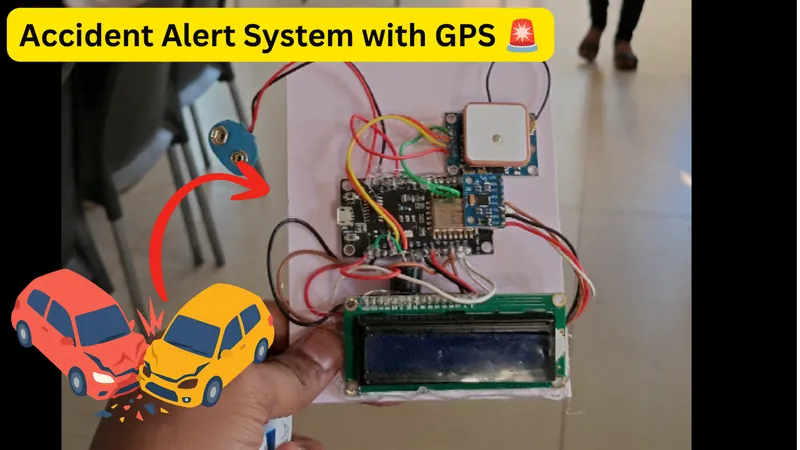
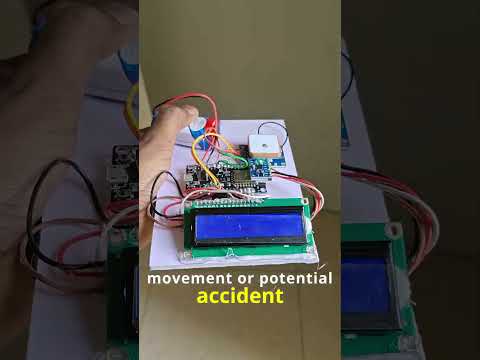
Road accidents can happen within seconds, and getting information about an accident quickly can make a huge difference. This project is a prototype of an IoT-based Vehicle Accident Alert System that monitors a vehicle's motion and orientation and sends an alert when it detects conditions that may indicate an accident. The system uses an MPU6050 accelerometer and gyroscope to monitor acceleration and vehicle tilt. A NEO-6M GPS module provides the vehicle's location and speed, while a NodeMCU ESP8266 processes the sensor data and connects the system to the internet through Wi-Fi. When a potential accident is detected, the system activates a buzzer and LED and sends an alert through Blynk, including available GPS coordinates, speed, pitch and roll. The Blynk dashboard can also be used for live monitoring. It is a pretty good problem-solving IoT project for beginner engineering students, because it combines sensors, embedded programming, GPS, wireless communication and a real-world safety application.

Build Completion Progress100%

Required Hardware Components (6)

NodeMCU ESP8266

The ESP8266 acts as the main controller of the project. It reads the sensors, processes the data and connects the system to Blynk over Wi-Fi.

MPU6050

The MPU6050 is a 6-axis IMU containing a 3-axis accelerometer and 3-axis gyroscope. In this project, it is used to measure acceleration and calculate approximate pitch and roll angles.

NEO-6M GPS

The GPS module provides geographical coordinates and GPS-based speed. These coordinates can be converted into a Google Maps location link.

16×2 I2C LCD

The LCD provides local information without requiring a phone. It displays values such as pitch, roll, speed and GPS status.

Buzzer & LED

These provide a local indication when a potential accident condition is detected.

Blynk

Blynk provides the IoT interface. The project sends speed, latitude, longitude, pitch and roll to the Blynk dashboard and uses Blynk events for accident notifications.

Step-by-Step Build Tutorial (11 Steps)

Step 1

Collect all the Required Components

NodeMCU ESP8266 MPU6050 Accelerometer + Gyroscope NEO-6M GPS Module 16×2 LCD with I2C Module Buzzer LED Resistor for LED Breadboard or Perf Board Jumper Wires | As required 5V Power Supply or 9v battery

Step 2

Make Circuit Connections

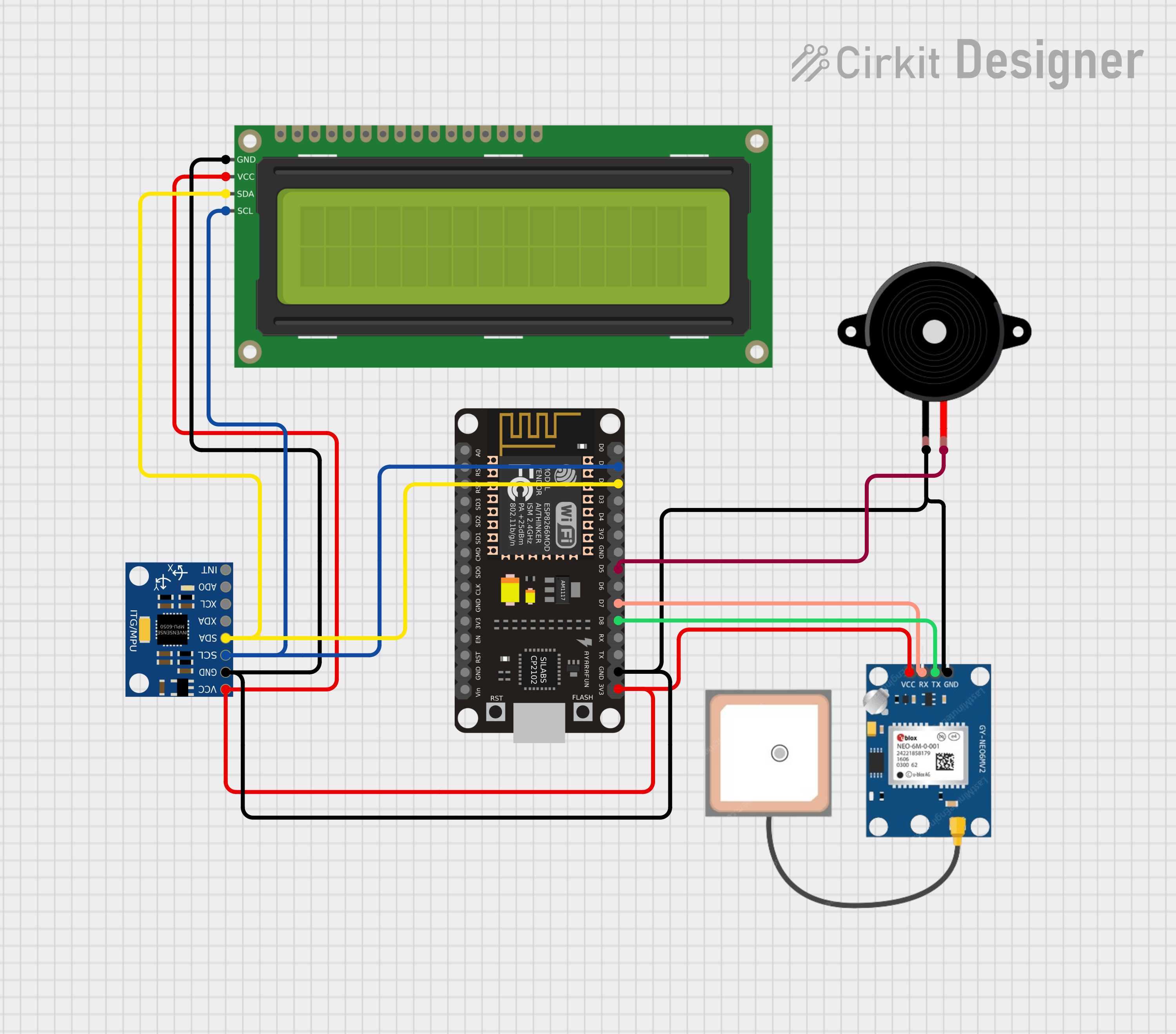
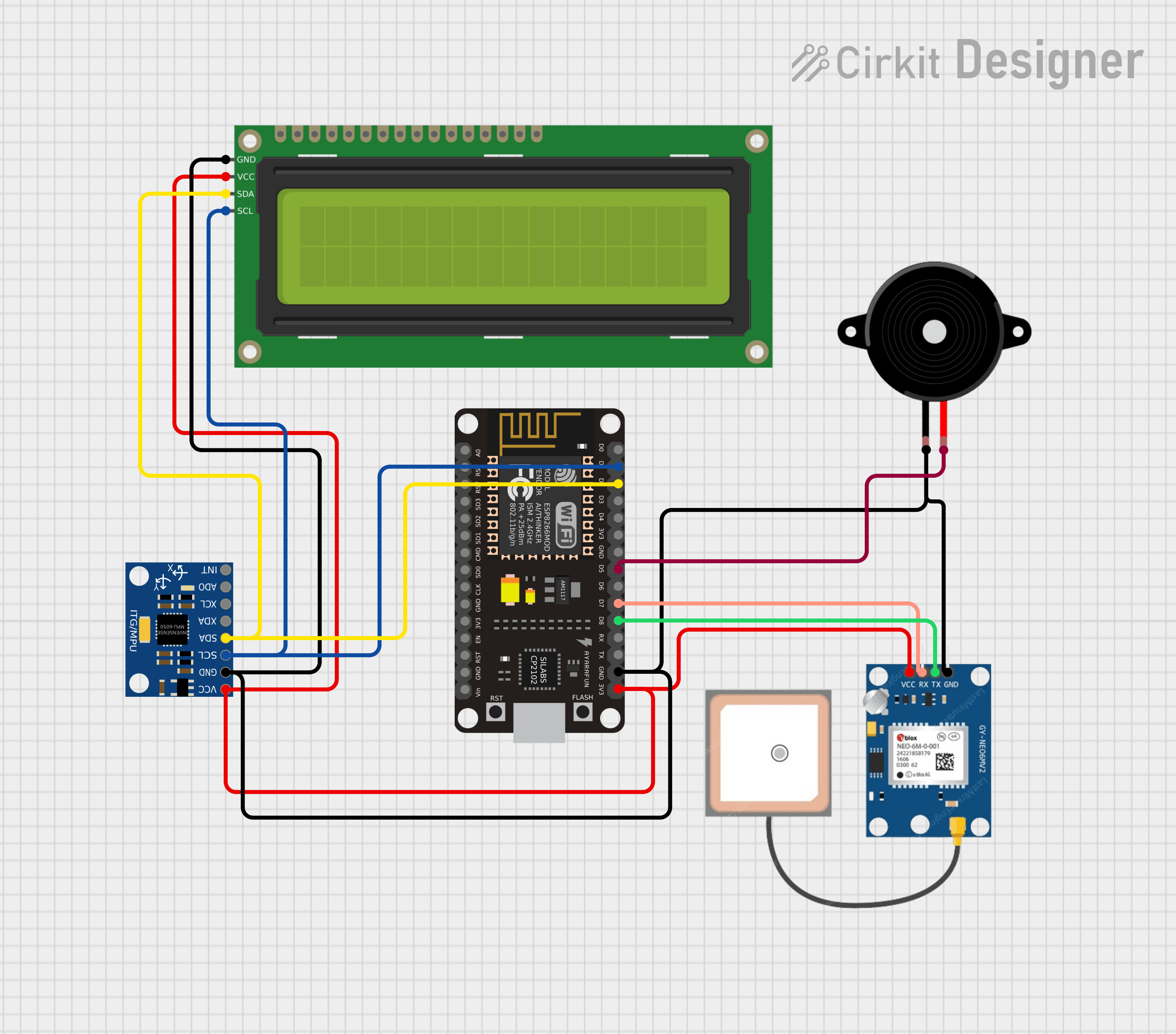
Circuit Connections MPU6050 → NodeMCU * VCC → 3.3V * GND → GND * SDA → D2 * SCL → D1 The MPU6050 communicates with the NodeMCU using the I2C protocol. NEO-6M GPS → NodeMCU * VCC → Suitable power supply * GND → GND * TX → D7 * RX → D8 16×2 I2C LCD → NodeMCU * VCC → Suitable power supply * GND → GND * SDA → D2 * SCL → D1 Buzzer → NodeMCU * Buzzer (+) → D5 * Buzzer (−) → GND LED → NodeMCU * LED (+) → D6 through a resistor * LED (−) → GND

Make Circuit Connections
Step 3

Test the MPU6050

Start by connecting the MPU6050 to the NodeMCU using the I2C pins. Upload a simple MPU6050 test program and check the accelerometer and gyroscope values through the Serial Monitor. Make sure the sensor responds when you move or tilt it before integrating it into the complete project.

Step 4

Connect the GPS and LCD

Connect the NEO-6M GPS module to the NodeMCU and connect the 16×2 I2C LCD to the same I2C bus as the MPU6050. The GPS should ideally be tested outdoors with a clear view of the sky, since getting a GPS fix can be difficult indoors. Once the GPS gets a fix, the module can provide latitude, longitude and speed.

Step 5

Assemble and Upload the Complete System

Connect the buzzer and LED, install the required Arduino libraries and configure your Blynk template. Before uploading the final code, replace: { #define BLYNK_TEMPLATE_ID "your_blynk_ID" #define BLYNK_TEMPLATE_NAME "your_Template" #define BLYNK_AUTH_TOKEN "your_blynk_auth_token" } with your own Blynk credentials. Also change: const char* ssid = "your_wifi_ssid"; const char* password = "password"; to your Wi-Fi credentials.

Step 6

Setting Up Blynk

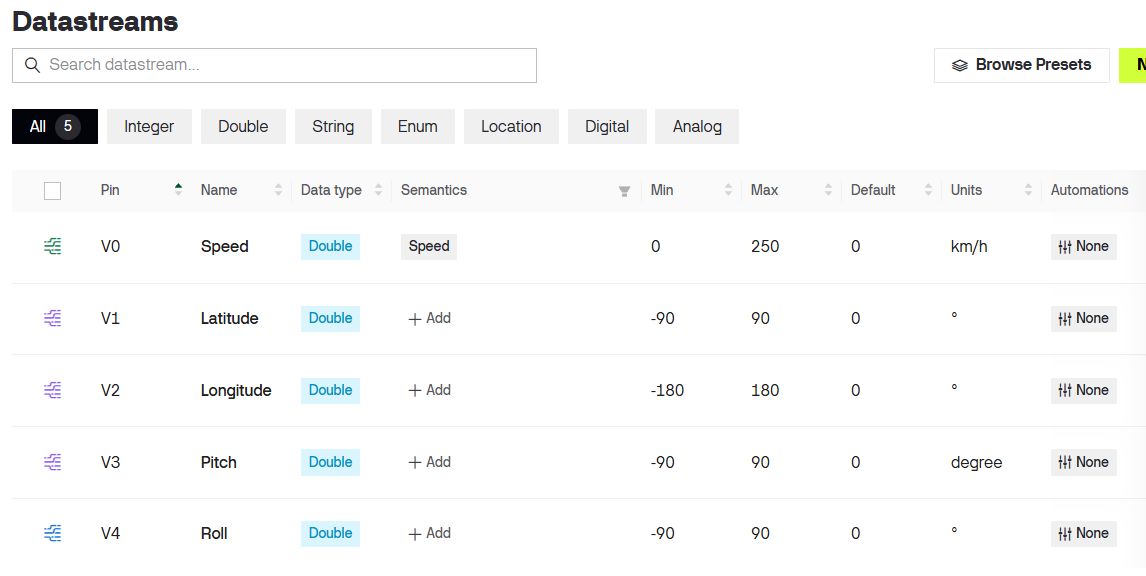
Blynk Virtual Pins * V0 → Speed * V1 → Latitude * V2 → Longitude * V3 → Pitch * V4 → Roll

Setting Up Blynk
Step 7

Accident Detection Logic

The project does not use a single sensor value to determine an accident. Instead, it checks two main conditions: 1. Sudden acceleration The accelerometer values are converted into acceleration in terms of g. The code calculates: accelMagnitude = sqrt(fax * fax + fay * fay + faz * faz); If the magnitude exceeds the configured threshold of approximately 2.3 g, the system considers it a potential impact. 2. Excessive vehicle tilt The system calculates: Pitch Roll If either angle exceeds approximately 40°, the system considers the vehicle orientation abnormal. Therefore, the current detection logic is essentially: High acceleration OR Excessive pitch OR Excessive roll ↓ Potential accident detected ↓ Buzzer + LED ↓ Blynk alert These thresholds are configurable and should be calibrated for the specific vehicle and mounting position. A real safety-critical system would require significantly more testing and validation before being relied upon for emergency response.

Step 8

GPS & Speed Filtering

Raw GPS speed can fluctuate even when the vehicle is stationary. This is normal for GPS modules because of positioning uncertainty and satellite conditions. To reduce this effect, the project uses a simple moving-average filter: const int SPEED_SAMPLES = 8; Small speed readings below 2 km/h are also treated as zero to reduce stationary GPS noise. The GPS coordinates are also rounded before being displayed. LCD Display The LCD provides local feedback from the system. The first line displays: P:10 R:-3 where: P = Pitch R = Roll The second line displays the GPS-derived speed: Spd:25.4kmh If the GPS has not obtained a valid location: GPS Fixing... When an accident condition is detected, the display changes to: !! ACCIDENT !!

Step 9

Blynk Live Monitoring

Blynk Virtual Pins * V0 → Speed * V1 → Latitude * V2 → Longitude * V3 → Pitch * V4 → Roll The Blynk dashboard allows the user to monitor the vehicle remotely. The dashboard can display: Speed: GPS-derived vehicle speed Latitude: Current GPS latitude Longitude: Current GPS longitude Pitch: Vehicle front/back orientation Roll: Vehicle side-to-side orientation This makes the project more than just an accident alarm — it becomes a basic IoT vehicle monitoring system.

Step 10

Accident Alert

When a potential accident is detected, the system activates the local buzzer and LED and generates a Blynk event. If a valid GPS location is available, the notification contains information such as: Accident Detected! Speed: XX km/h Pitch: XX° Roll: XX° Location: XX, XX Google Maps Link The Google Maps link is generated using: https://maps.google.com/?q=LATITUDE,LONGITUDE If GPS does not have a valid location at the time of detection, the system still sends the accident alert, but indicates that the GPS location is unavailable.

Step 11

Programming the ESP8266

Code is Available on Github

Circuit Schematics & Block Diagram

Architecture Diagram

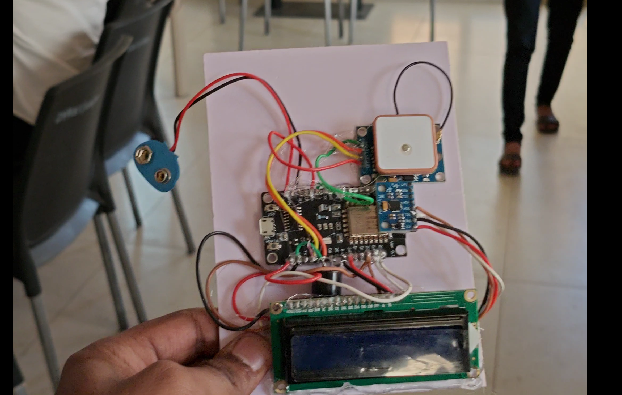
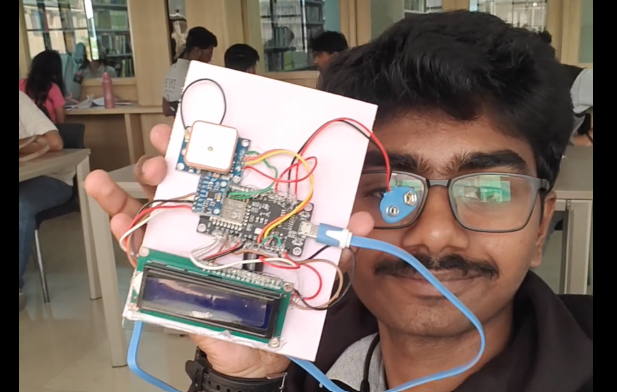
Additional Photo Gallery (2)

Additional Build Notes & Firmware Specs

Important Limitation This project is a prototype, not a certified automotive safety system. Acceleration spikes and large tilt angles can also occur during situations that are not accidents—for example, dropping the device, driving over a large bump, or intentionally tilting the vehicle. Similarly, GPS accuracy depends on satellite visibility and environmental conditions. For a real-world deployment, the detection algorithm would need additional parameters such as gyroscope data, duration of the impact, vehicle speed, multiple sensor readings and validation against real accident scenarios. Future Improvements The prototype can be expanded considerably: 📡 Add a GSM module such as SIM800/SIM900 for cellular alerts without Wi-Fi. 📞 Automatically make an emergency call. 🗺️ Add live tracking using a suitable IoT/cloud platform. 🔋 Add battery-voltage monitoring. 📳 Add a cancel button to prevent false emergency alerts. 🧠 Improve accident detection using multiple sensor parameters. ☁️ Store vehicle data in the cloud. 🚗 Integrate the system into an actual vehicle enclosure. 📱 Develop a dedicated mobile application.